
Fees, which are considered donations from approved services, and TTS voices, which viewers can only select from a list approved by the streamer. A new chat game called “Hot and Cold” has been added to Ultra; viewers now have their own settings page, and streamers can choose where to place their account menu.
We’ve compiled the key changes from October 14–19: what’s new, what’s been improved, and what’s been fixed.
01Donation Fundraisers: Custom Rules for Each Fundraiser **[BETA]**
Previously, a fundraiser simply combined all donations from connected services. Now, each fundraiser has its own sources, and these can be assigned to different overlays. For example, donations from DonationAlerts and DonatePay go toward repairs, while everything else goes toward a new camera.
For each service in the fundraiser editor, on the “Sources” tab, you can choose:
- DonationAlerts: exclude, include all donations, include only specific DonationAlerts fundraisers, or include all donations except those from these fundraisers.
- DonatePay: exclude or include all donations.
- DonateX: exclude, include all donations, or include only the current DonateX fundraiser.
DonationAlerts fundraiser via link. If you already have a DonationAlerts fundraiser running, paste a link to its widget and specify how much has been raised so far today. From then on, our fundraiser will grow alongside it: viewers select the fundraiser on the DonationAlerts donation page, and the amount appears in your overlay. You can link multiple fundraisers.
If the DonationAlerts fundraiser has been closed, a warning will appear in the editor. Our fundraiser will continue to accumulate funds: the gauge will remain filled, and the total amount will be visible in the numbers, for example, 100,000 out of 50,000.
Fundraising Log. In the new “Log” tab, you can see the breakdown of the total amount: donations by service, increases from linked fundraisers, and manual adjustments. If you manually adjust the total while the livestream is in progress, donations received during that time will not be lost.
To link DonationAlerts collections, go to “Settings → Integrations” and click “Reconnect” next to DonationAlerts: the service will request access to your collections. Other donations will continue to work as before without needing to be reconnected.
How “all donations except DonationAlerts fundraisers” are calculated
DonationAlerts does not specify which fundraiser a particular donation went to: it sends the donation and, separately, a new fundraiser total. Therefore, we subtract the increase in linked fundraisers from all DonationAlerts donations. The final amount is accurate, and such entries in the log are marked as “guessed”: we determine which specific donation went to which fundraiser based on the amount and time.
02A New Chat Game: “Hot and Cold”
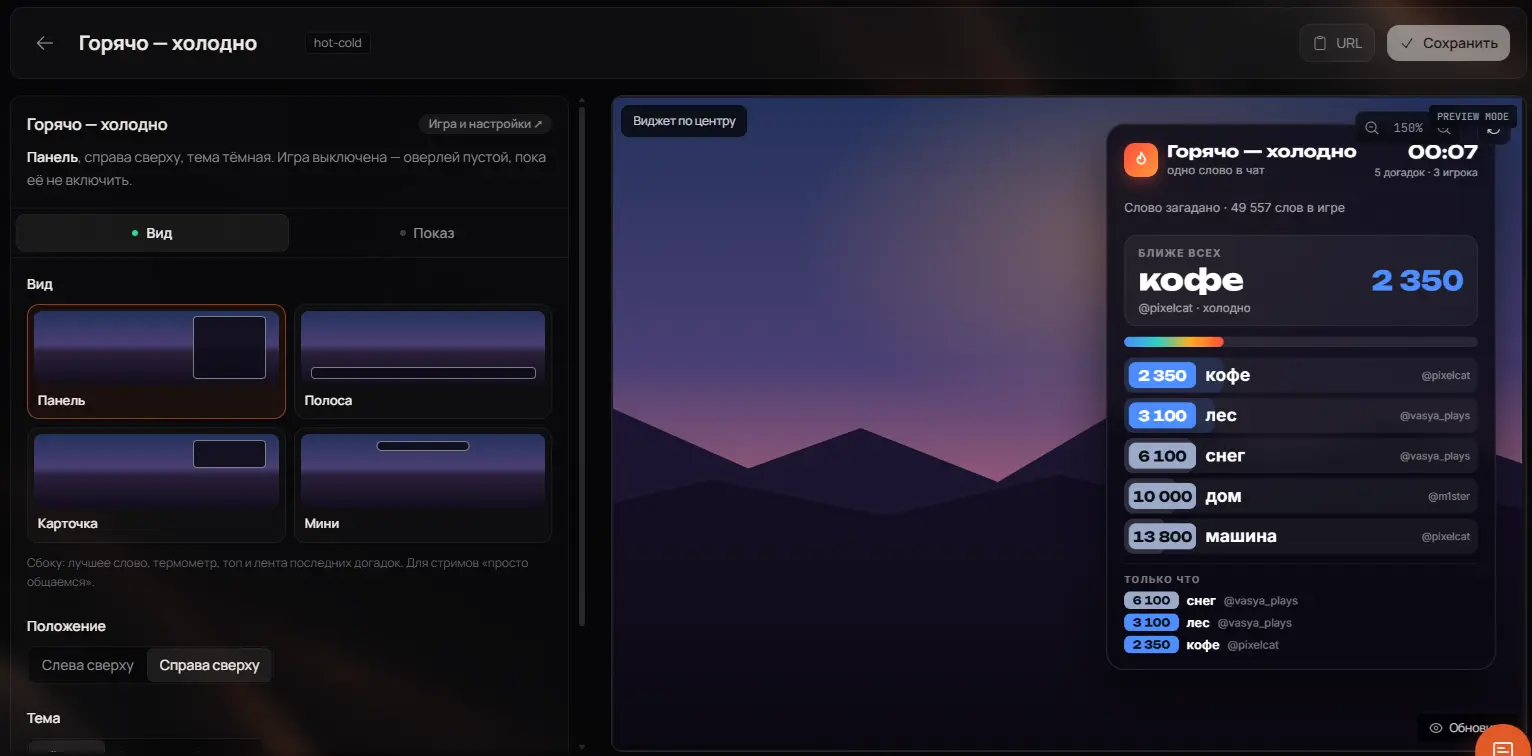
A new game has appeared on Ultra where viewers guess a word based on its meaning rather than its letters. The bot thinks of a word, the chat posts guesses, and each guess is ranked based on how close it is to the target word. “Cat” is closer to “dog” than to “tractor.” The first person to type the actual word wins.
If you’ve played “Context,” the idea will be familiar. The difference is that here, the entire chat plays at once, and the ranking of guesses is visible right on the stream.
How to Read the Bot’s Clues
The “position” is the word’s number in the dictionary, sorted by proximity to the guessed word. The lower the number, the closer you are:
- 1 — guessed correctly, round over;
- up to 50 — hot;
- up to 300 — warm;
- up to 1,500 — cool;
- up to 5,000 — cold;
- beyond that — ice.
Here’s what a round looks like in the chat:
зритель1: машина → 2 814 место
зритель2: море → 412 место
зритель3: пляж → 37 место 🔥 новый лучший результат
💡 Подсказка: «песок» — 9 место
зритель2: отпуск → 1 место 🏆 угадано за 4 мин 12 с
The game runs automatically
A round starts automatically during the live stream, and after a win, the next one begins a few seconds later. If the chat can’t come up with a word for a long time, the bot gives hints: first, it names a word closest to the best result, then the number of letters, and finally the first letter.
The winner receives rank experience and points. “Scouts”—viewers who set the closest guess record during the round—also receive a small reward.
What You Can Customize
- Words: random from the entire set, only selected themes, or your own list of up to 300 words. Difficulty levels include easy, medium, or hard.
- How to submit guesses: any single word in the chat, or only via the command
!g word, if you don’t want the game to respond to regular messages. - Who plays: all viewers, only followers, or only subscribers.
- Hints, rewards, and bot messages — custom texts or standard ones.
- Overlay: panel, strip, card, or mini, in dark, glass, or light theme.
How to get started
- Open “Hot or Cold” in your dashboard
This section is available on Ultra.
- Set up the words and hints
You can leave everything at the default settings and start right away.
- Add the overlay to OBS
In the “Overlays” section, create a “Hot or Cold” overlay and paste the link into the “Browser” source.
- Start your stream
The round starts automatically, and the chat will post the first guesses.
Learn more about the game on the [“Hot and Cold” for Twitch]](/goryacho-holodno) page. And the classic letter game is still available on all plans: “Guess the Word”.
03The “Top Donors” overlay in “Per Stream” mode sometimes displayed donations from nearly a full day ago: it would include the previous stream or assume the stream was still live.
04Message Voiceovers Now, the window shows data from the most recent stream. A brief restart of the stream (up to 15 minutes) is considered part of the same stream.
05Voice Announcements
- Your own reward for channel points. In TTS, you can select an existing channel reward, even one that wasn’t created through RobinSystem. However, we recommend creating the reward directly in your account dashboard: this way, we can enable, disable, and return points to the viewer if the voice synthesis fails.
- The list of voices for viewers is now fully functional. If you set the TTS settings to allow viewers only selected voices or to hide some of them, the hidden voices will disappear from the viewer’s page and will not be played during the stream. For those who selected a voice before the restriction took effect, messages will be voiced by the streamer’s voice.
- Voices with a private key. On the viewer’s page, the ElevenLabs and Fish Audio tabs no longer scroll the page or reset the voice list. If you don’t have a key, the tab clearly states that it’s for a personal key and explains what you need to enter to play your own voices.
- New voices. The list of voices from the FishAudio provider has been expanded and is now available to everyone without exception.
- ElevenLabs. Preparing for deactivation. We are discontinuing this provider due to financial constraints regarding quality and pricing. You can still use it on your own without exception, but it will be removed from the subscription. FA limits will be increased, as they were during testing.
06Settings Page for Viewers
Viewers now have a “Settings” page in their viewer dashboard. You can access it from the header or the avatar menu. It includes:
- personal ElevenLabs and Fish Audio keys, as well as your Fish Audio voices by ID;
- one-click Telegram linking and unlinking;
- notifications about the start of a stream: you can select specific streamers.
07Overlays
- FaceIT widget: four compact styles. “Killfeed” for Free, “Live” for Premium, “Native,” and “Premier” for Ultra. For players in the top 1,000, a top icon is displayed instead of their rank.
- Custom chat templates (Ultra). You can save up to three chat layout options with all settings and your own code, and switch between them for different streams.
- Chat in the OBS dock and co-streams. Messages from co-stream partners’ chats are now labeled with the channel they came from.
- GIFs in chat history no longer disappear after reloading the page.
08Account
- Menu at the top or on the left. In “Settings,” you can choose where the account menu will appear. For new users, the menu is displayed at the top by default; for everyone else, everything remains as it was.
- Single-page settings instead of tabs, and the “Assistants” section has been moved to a separate page.
- Assistants 2.0. You can decide which actions an assistant performs on its own and which require your approval. You can pause or set a time limit on the assistant’s access. Approval requests appear in the notification bell.
- New payment page. You can see how much time is left until your subscription ends; five days before it ends, the expiration date is highlighted in red.
09Public API for Ultra
The API with private keys has been upgraded to version 2:
- Up to five keys per channel, each with a name, expiration date, and its own set of permissions;
- Permissions can be changed without reissuing the key, and the key itself can be changed with a single click;
- a seven-day request log;
- management of overlays, voice chat, commands, triggers, games, giveaways, predictions, ranks, the store, and live streams;
- Webhooks: new channel events, donations, start and end of a live stream, new rank.
The documentation in your account shows only what is available to your key.
10Reliability
- Requests to DonationAlerts go through a shared queue to avoid hitting the service’s limits. Donations are processed separately from the rest of the site, so failures in one part have less impact on the other.
- Follower synchronization is now easier on the database and more accurately tracks unfollows.
- Fixed an issue where turning off the bot would result in several identical emails being sent at once.
11New Features in Testing
League of Legends “Gold” Themes
We’re preparing a series of LoL-inspired designs for the chat, predictions, fundraising goals, and the horizontal top donor list.
These themes are currently in testing.
Frequently Asked Questions
How do I start “Hot or Cold”?
Open the “Hot or Cold” section in your account (Ultra plan) and add the game overlay to OBS. Rounds will start automatically during your stream.
Do I need to do anything to keep the old collection working?
No. The old collections still track donations from the same services as before. The new settings will appear on the “Sources” tab.
Why can’t I link the DonationAlerts collection?
Most likely, you had DonationAlerts connected before this update. Click “Reconnect” next to DonationAlerts in “Settings → Integrations.”
How often is the current DonateX fundraiser total updated?
Once per minute.
A viewer selected a voice that I later hid. What happens?
Your default voice will read their messages aloud, and the hidden voice will disappear from the list on the viewer’s page.
Start small: split donations between two funds or let viewers choose a few of their favorite voices to hear. Little touches like these make the broadcast noticeably more lively.